Cyberpunk 2077 has run natively on macOS since July 2025 — and almost nothing the modding scene builds runs with it. The Mac build has no CET, no RED4ext, no ArchiveXL or TweakXL; the modding wiki lists redscript alone as unofficially supported, which rules out most of what people actually install. So the mods stay where the Windows build is: inside a CrossOver bottle.
Which leaves the managing of them. Vortex, MO2 and the Nexus app are Windows programs, so the usual answer is to run one inside the same bottle it is meant to manage — people do get that working. It is still a Windows file manager wearing a Windows theme, sitting in a Wine prefix, on your Mac.
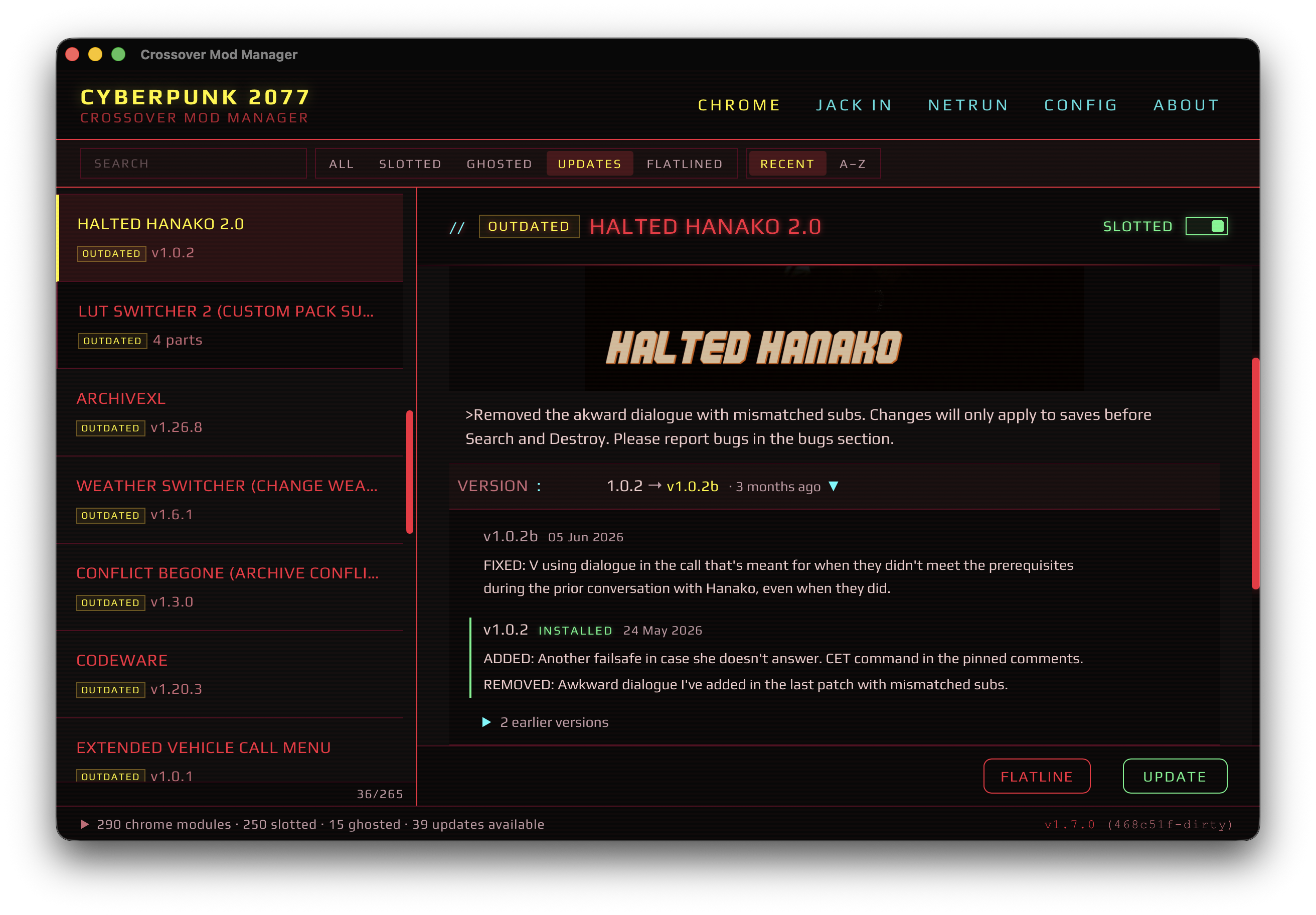
Crossover Mod Manager is a native macOS app that reaches into the bottle from outside. It speaks NXM links, so Download with Mod Manager on NexusMods hands the mod straight to it, and it writes files where CET, TweakXL and REDmod actually look for them.
It is a pet project, and it looks like one on purpose: the whole thing is styled after Night City rather than after a file browser. The part underneath is meant to be dull and correct.
Download the latest release · Source on GitHub
What it does
- One-click installs from NexusMods. Click Download with Mod Manager in your browser; the app catches the NXM link, downloads, unpacks and installs.
- Handles ZIP, 7z and RAR, including archives packed on Windows that store their paths with backslashes — on macOS those become part of the filename instead of folders, and the mod lands as one long file the game can’t follow.
- Keeps the game’s folder casing straight. Archives spell the game’s own
folders every which way —
Archive/,R6/,BIN/. The installer writes them under the casing the game uses, so a mod’s files join the real folders instead of forming a set of near-identical ones beside them. - Checks what a mod needs before installing it. A mod’s NexusMods page lists its requirements; before anything is downloaded, the app checks them against your install — not there, switched off, removed — and asks whether to go on. Optional ones are shown apart. NexusMods lists no versions, so only presence is checked.
- Checks for updates against NexusMods, tells you which of your mods have a newer version, and shows what changed in between — for a mod installed as several files, each file’s own history.
- Uninstalls what it installed. Every file the app puts on disk is tracked and goes with the mod, emptied folders included — the switched-off ones too, whose files sit on disk under a different name.
- Doesn’t break one mod by removing another. When two mods ship the same file — a patch replacing its parent’s script — switching one off or removing it leaves the file the other still uses, and says so.
- Repairs mods that installed wrong, including ones put there by older versions of this app: a scan reports what it would move before anything is moved.
What you need
- macOS 11 or later, Apple Silicon
- CrossOver 25 or later
- The Windows build of Cyberpunk 2077, installed in a bottle
- A NexusMods account, for the API key
First launch
The app is ad-hoc signed and not notarized — there is no paid Apple Developer account behind this project — so macOS blocks it the first time. On macOS 15 Sequoia and later, open it once, let it be blocked, then go to System Settings → Privacy & Security → Open Anyway. The README covers the Terminal route and why Control-click → Open no longer works.
Free and open source, MIT licensed. Bugs and feature requests go to Issues.
Not affiliated with CD PROJEKT RED, CodeWeavers or Nexus Mods.